
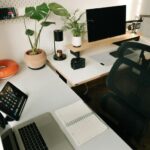
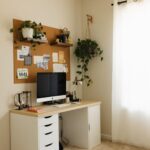









Creating a home workspace that is both organised and productive can make a significant difference to how you work and feel throughout the day. Whether you’re working remotely full-time or occasionally using a corner of your home for tasks, setting up an efficient area helps reduce distractions, increase focus, and even improve your wellbeing. Here are some practical tips to get your home workspace in top shape.
Choose the Right Spot
Find a Dedicated Workspace
It’s important to select a specific area in your home exclusively for work. This helps your brain separate work time from relaxation time. Ideally, pick a quiet spot away from main living areas if possible.
Consider Lighting and Ventilation
Natural light is great for productivity and mood. Position your desk near a window if you can. Also, ensure your space is well ventilated to keep fresh air flowing—it helps to stay alert and feel comfortable.
Declutter and Organise Your Desk
Keep Only Essentials on Your Desk
Having too many items can be distracting. Limit what stays on your desk to what you use daily like your computer, a notebook, and writing tools.
Use Storage Solutions
Invest in desk organisers, filing trays, or drawers to keep papers and accessories neat. Label storage where possible to find things quickly.
Cable Management
Tangled wires can make the workspace feel messy. Use cable clips or tubing to tuck away cables neatly and avoid tripping hazards.
Optimise Your Furniture and Equipment
Choose Ergonomic Furniture
Comfortable seating and a desk at the right height prevent aches and support longer working sessions. Consider an adjustable chair that supports your back and feet flat on the floor.
Invest in a Quality Monitor and Keyboard
Using an external monitor and keyboard, if you work on a laptop, allows for better posture and reduces eye strain.
Arrange Your Equipment Wisely
Place frequently used items within easy reach to avoid interrupting your work to search for them.
Manage Your Time Efficiently
Set Clear Working Hours
Establishing a routine helps maintain work–life balance. Set start and finish times for your workday to prevent overwork.
Use a Planner or Digital Tools
Track your tasks and deadlines with a planner or apps. Prioritise your to-do list to focus on important tasks first.
Take Regular Breaks
Short breaks enhance productivity and prevent burnout. Follow techniques like the Pomodoro method, working for 25 minutes, then taking a 5-minute break.
Personalise Your Space, But Keep it Professional
Add Inspiration
A few personal items like plants, photos, or artwork can make your workspace more inviting and inspiring.
Avoid Excess Clutter
While personalising is good, too many decorations can become distracting. Keep the space balanced and functional.
Maintain Cleanliness Daily
End-of-Day Clean Up
Spend a few minutes tidying your desk at the end of each day. File papers, clear crumbs or dust, and reset your space for tomorrow.
Regular Deep Cleaning
Once a week, wipe down surfaces, keyboard, mouse, and clean your chair. This promotes a healthy environment and keeps things fresh.
Minimise Distractions
Limit Noise
If noise is an issue, consider noise-cancelling headphones or playing low-volume instrumental music to improve concentration.
Put Away Phones and Social Media
Keep your phone out of reach or on silent during work hours to avoid interruptions. Use apps to block distracting websites if necessary.
Conclusion
Creating an organised and productive home workspace is about combining practical organisation with personal comfort. By choosing the right location, keeping your desk tidy, investing in ergonomic tools, managing your time effectively, and maintaining a clean environment, you can enjoy a workspace that supports your best work every day. Remember, small changes can lead to big improvements in how you feel and perform while working from home.